itch collection manager
A downloadable tool
Manage Your itch.io Collections in Batches
itch.io only lets you edit collections one game at a time, which quickly becomes tedious as your library grows.
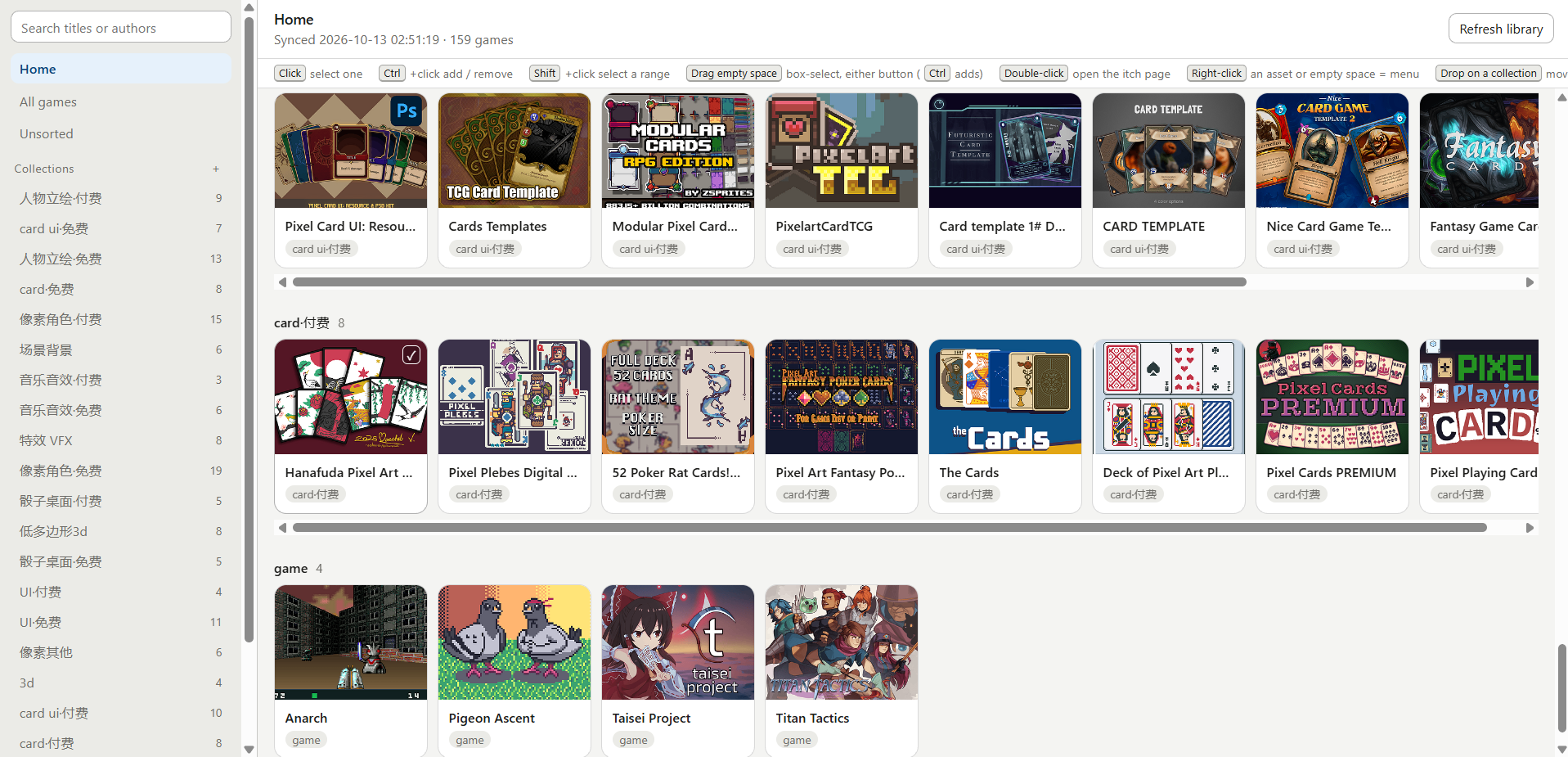
itch-colmgr turns collection management into batch work. Browse your library in a cover-art grid, organize games with drag-and-drop, select multiple items at once, and manage collections through a sidebar tree. Changes stay local until you review and confirm them, then get written back to itch.io in a batch.
Packaged Windows build included — just double-click to run. No Python required.
Features
- Drag to file — Drop a game onto a sidebar collection to add it. Hold
Ctrlto add it to multiple collections. Drop it onto the red bin to remove it, or onto empty space to cancel. - Reorder games — Drag games between cards in a collection view to change their order. The new order is written back to itch.io.
- Multi-select — Select items with click,
Ctrl+click,Shift+click, or marquee selection. Use the toolbar to add, move, remove, or remove games from all collections. - Multiple views — Switch between grid and list views, browse a Home shelf, and use right-click menus for quick actions.
- Search — Find games by title or author.
- Bilingual interface — Switch between Chinese and English from the sidebar.
Getting Started
- Download and launch. Unzip the package and double-click
itch-colmgr.exe. A small window will display the local address and data folder, then open the interface in your browser. Closing the launcher exits the application. - Connect to itch.io. On the setup page, paste your itch.io API key. You can create one in your itch.io API key settings. Configure a proxy if needed, then click Connect and sync.
- Organize your library. Use drag-and-drop, multi-select, search, and the collection sidebar to make your changes.
- Review and write. Click the Not yet written to itch indicator to review pending changes. Confirm the write when you're ready.
Want to try it first? Click Try the demo data first on the setup page to explore the full interface without an API key. Writes are simulated in demo mode.
Data & Safety
- Local-first workflow — All browsing and editing operations happen against local state. Dragging items around does not trigger network requests.
- Human review before writing — Review pending changes before confirming them. Warnings flag games that would end up in no collection and collections that are about to be deleted.
- Undo the last write — Undo the most recent completed write run.
- Rate-limited writes — Requests are limited to one per second by default, with retries and checkpoint-based resume support.
- Portable data —
data/andconfig.local.jsonare stored alongside the executable, so you can move the entire folder together. - Automatic port fallback — The default local port is
8756. If it is already in use, the application selects another port. - Your API key stays local — The key is stored locally and is never uploaded by the tool.
Notes & Limitations
- Windows 64-bit only.
- The executable is not code-signed, so some antivirus software may flag it. Verify the source if you're concerned before allowing it to run.
- You need your own itch.io API key. The tool uses collection-writing endpoints documented in itch.io's official API documentation.
- The sidebar collection order is a local preference and is not written back to itch.io, as itch.io does not provide an endpoint for it.
Open Source
Licensed under AGPL-3.0.
- Source code & latest release: https://github.com/fragule-hub/itch-colmgr
Issues and contributions are welcome!
Download
Click download now to get access to the following files:
Leave a comment
Log in with itch.io to leave a comment.